The first thing I ever built was a tiny browser game. You tap to keep a paper plane in the air and fly it through the gaps between storm clouds.
The idea behind everything on this site is the same. I am not a coder, and I want to see how far someone like me can get anyway, with AI writing the code. Paper Drift was my first try. I wanted to know what starting a webapp from zero is actually like, and I also just wanted a little game to play, so I made it one project.
There was no business plan and I was never going to put it on an app store. I just wanted to build it, play it, and see what broke.
It took a few different AI tools, a few names, one turtle and a few months, with a long gap in the middle. This is roughly how it went.
What I used
If you want to try something like this, this is everything I needed:
- An AI app builder. You describe an app in plain English and it builds a working version you can click around in.
- GitHub. This is where the code lives. The builder can create the GitHub repository for you, so you don’t need to know git to start.
- Vercel. It takes the code from GitHub and puts it on the internet. The free plan is fine for a small game.
- AI coding tools, later on, such as Codex or Claude Code. They can read the code in your GitHub repository, make changes and open them for you to approve.
- A domain, if you want your own address. This is optional.
Everything above runs in the browser. I didn’t install anything on my laptop to get the first version online.
One prompt and it was playable
I asked the app builder for a simple tap-to-fly game, and the very first thing it gave back was already playable. A character, obstacles, a score, a best score and a “Ready to Fly?” start screen.
Inside, it was four small pieces: the character, the obstacles, the start and game over screen, and one bigger file that moves everything and checks for crashes. I didn’t know that at the time. I pressed Space and it worked, and that was enough for me.
It also gave me the wrong idea about how long the rest would take.
The turtle detour
Soon after the first version, I asked for an underwater theme. The character became a turtle, the obstacles became coral, and it was renamed Turtle Reef. I had it redraw the turtle and the coral a couple of times.
Then I threw all of it away and restored the earlier version. There’s no note saying why.
What I did learn from it is that going back is cheap. The builder keeps every version, and restoring one is a click. That made me a lot less scared of trying things.
Small features, and undoing them
Over the next few days I kept asking for small things:
- A short pause before the first obstacle, so you don’t crash the moment you start.
- A “Save Screenshot” button on the game over screen. I took it out again soon after.
- Sound effects.
- Difficulty changes.
The difficulty changes are a good example of how I worked back then. I asked for it to be easier to play, then straight after asked for it to be a bit harder.
That’s also where the feel of the game comes from. Gravity pulls the plane down a bit more every frame, and a tap pushes it back up. The floaty, slightly panicky feeling is those two numbers pulling against each other. Change either one and it plays like a different game.
Putting it online
Once the code was in GitHub, I imported the repository into Vercel. It worked out the build settings by itself. I clicked Deploy and it was live.
From then on, every change came in as a pull request, and Vercel built a preview link for each one. I could play the new version on that link before merging it into the real site. I still work this way on every project.
Then I didn’t touch the game for a few months.
Making it fit a phone
When I came back, I used an AI coding tool. The game was a fixed box, and on a small phone it got cut off.
The fix was to keep the game box the same size on the inside and shrink the whole thing to fit the screen. The physics and the crash checks still work in the same space, so the game plays the same on every screen. Only the picture gets smaller.
Two things from that round are worth knowing:
- The AI made two different versions of the same fix from one task, and I merged both. I didn’t really understand that I was merging two answers to the same question.
- In its own notes, the AI said it couldn’t run its browser tests where it was working. So it never actually saw what it had built. That’s normal with these tools and easy to forget. The preview link is where you check it yourself.
The builder’s branding was also still in the page’s hidden details, the bits that show up when you share a link, so that got cleaned out.
Giving it its own name and look
I wanted the game to be properly its own. So the character became a paper plane, the obstacles became storm clouds, and the game became Paper Drift.
One detail I wouldn’t have thought of. Your best score is saved in your own browser under a label, and a rename changes that label, which would have quietly wiped everyone’s best score. The game now checks the old labels first and carries the score over.
One thing the AI got wrong: in its notes, it said the game was hosted somewhere it isn’t, mixing it up with this site. Now where each project is hosted is written down in the instructions file the AI tools read, so the next session doesn’t guess.
A lot of redrawing
Most of the Paper Drift work happened in one long day of back and forth.
The AI made a change and opened a pull request. I merged it into a test branch, Vercel built a preview, and I played it and said what looked wrong. Then again, many times over.
The plane went through five versions. When the AI redrew the first one, its own note said the old plane looked like “a flat two-tone arrow (basically a mouse cursor)”. In the end I supplied the art myself, a lined-paper dart, and it used that.
The storm clouds went through nine.
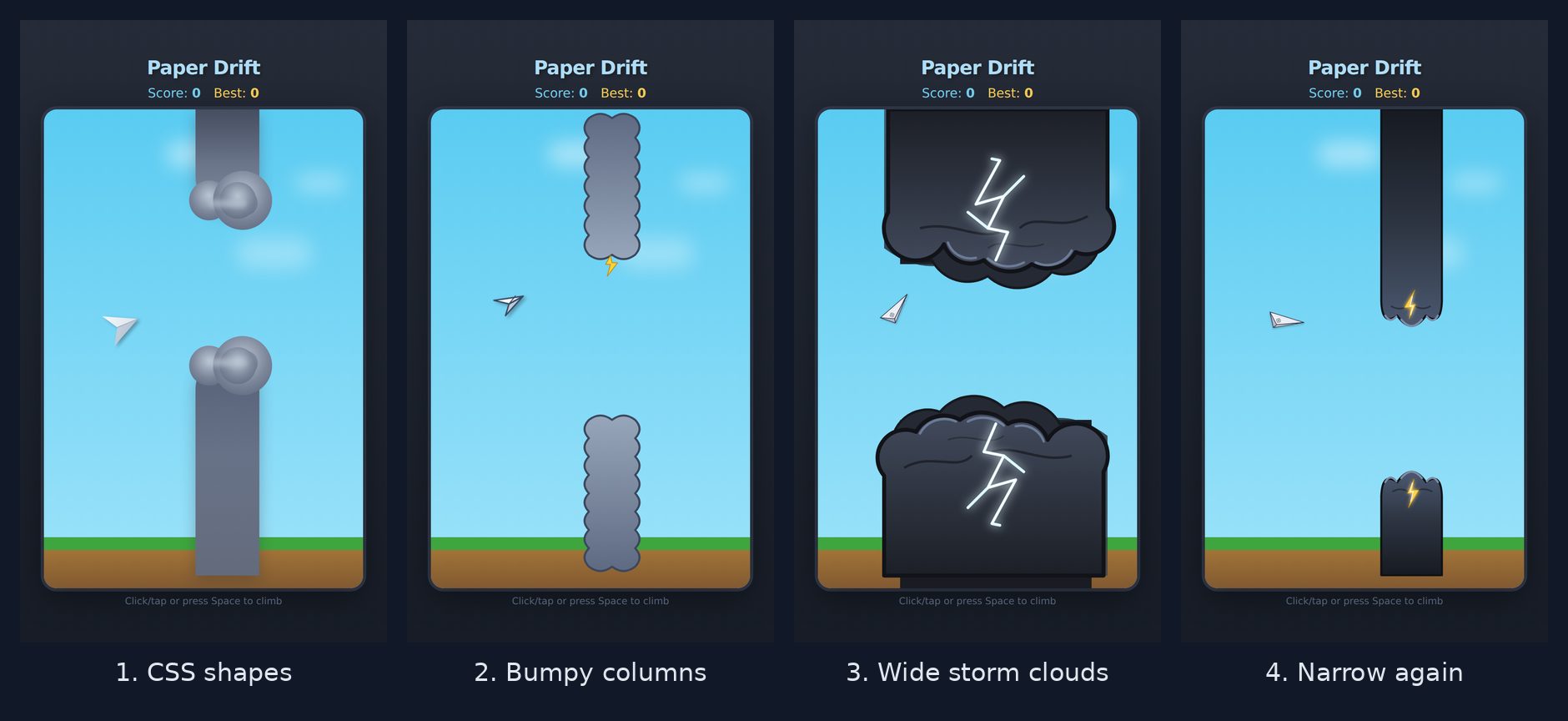
The wide clouds in the third picture looked the best and played the worst. I shrank them twice, then had them redrawn narrow from scratch because the squeezed version looked pinched.
The other lesson was about hitboxes. The game doesn’t know what the cloud looks like. It checks whether two invisible rectangles overlap, one around the plane and one around each cloud. If the drawing and the rectangle don’t line up, you die in clear air, or you fly through something that looks solid. Every time the art changed, the rectangle had to change with it. “No dying in clear air” ended up being the rule I kept repeating.
The bug that was there from day one
The most important fix was one I didn’t even know I needed.
The original game moved the plane a fixed amount every time the screen redrew. Most screens redraw 60 times a second, but newer phones and some monitors redraw 90 or 120 times a second. On those, the plane fell and the clouds moved about twice as fast as they should.
So for a while, the game was much harder on a nice phone than on an old one. The fix was to move things based on how much time has passed, not how many times the screen redrew. Now 60 and 120 play the same.
If you’re building any kind of game with AI, ask for this in your very first prompt. It’s much easier to start that way than to fix it later.
Going pixel
After nine storm clouds I stopped trying to make them look real. I had added a hidden shelf to this site for small retro-style games, so I had Paper Drift redrawn as pixel art to match it.
Everything is now drawn on a grid of 4 pixel squares. A night sky, blocky storm clouds, a pixel plane and a chunky arcade font. The screen sits in a console frame with the score along the top, and there are faint scanlines over it like an old TV.
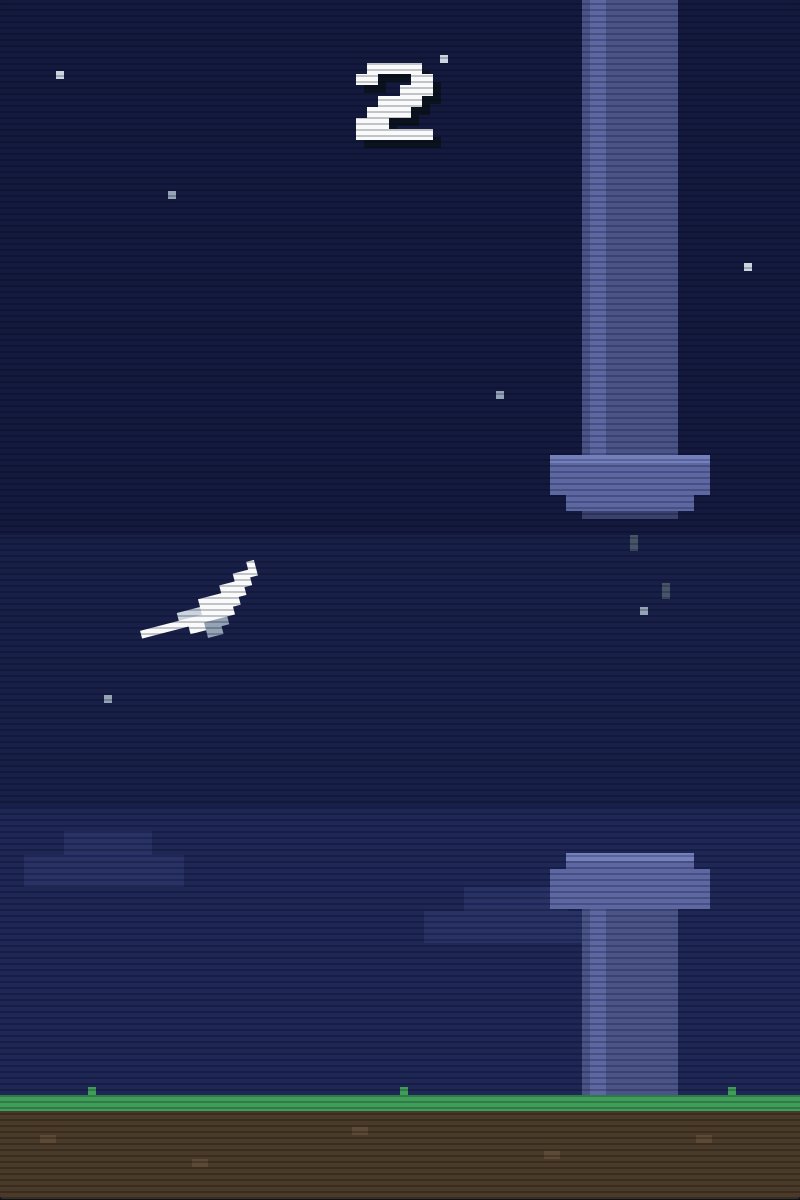
Only the look changed. The game area is still 400 by 600, so the physics, the controls, the sound and your saved best score are all the same. The crash check is still two invisible rectangles underneath. The art just sits on top.
I did change one thing about the game while I was in there. The gaps between the clouds are about 10% smaller now, so it’s a bit harder.
What’s inside now
I don’t read the code, but I do ask about it. Some of the answers surprised me.
The whole game is still more or less one file: a fixed game area, a plane, some clouds and a score. A crash is two rectangles overlapping. Your best score is saved in your own browser.
The sound was my favourite surprise. There are no audio files in the project. The browser makes the sound effects on the spot, from a few notes written straight into the code.
The AI playing its own game
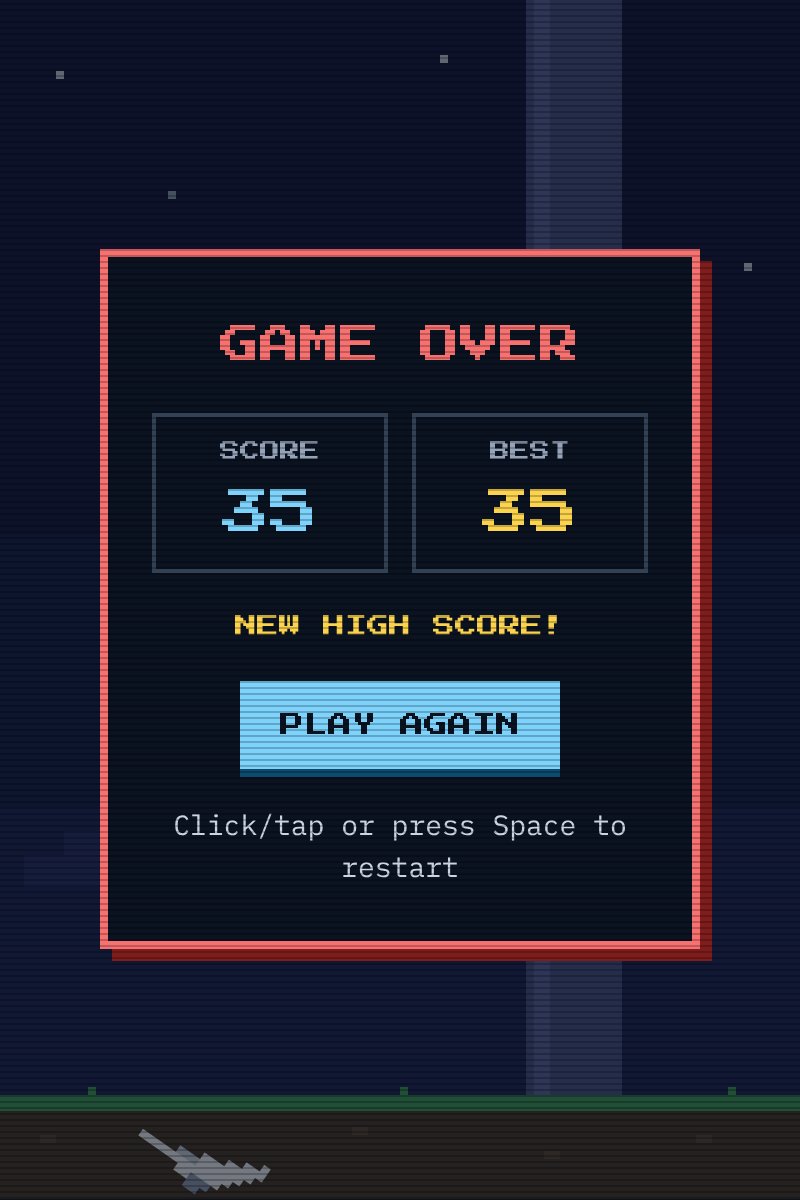
The gameplay screenshots aren’t me playing. I got the AI to write a small autopilot script and play its own game while taking screenshots. It scored 3. I found that quite funny, because that’s about what I usually get too.

After the pixel redraw I needed new screenshots, so the AI wrote a new autopilot. This one scored 35, with the smaller gaps. That’s a lot less funny.
If you want to build your own
This is the order I would do it in now, knowing what I know.
-
Pick an original name and look first. Before you buy a domain or write any code. Every rename touches the domain, the page title and the saved scores.
-
Describe the game to an AI app builder in one go. Something like this:
Build a simple browser game with a paper plane flying between storm clouds. Tap, click or press Space to climb. Use a fixed 400x600 game area that scales down to fit phones. Move everything based on elapsed time, not per frame, so it plays the same on 60Hz and 120Hz screens. Keep each obstacle's hitbox the same size as its drawing. Save the best score in the browser. -
Play it and ask for one change at a time. Small requests are easier to undo. If a change makes it worse, restore the earlier version and move on.
-
Connect GitHub, then import the repository into a host like Vercel and deploy. That’s your live site.
-
Optional: add your own domain in your host’s settings. It tells you which DNS record to add wherever your domain is managed.
-
When you outgrow the builder, move to an AI coding tool. Connect it to the same GitHub repository and keep going from there. Ask it to write an instructions file with where the app is hosted and any rules you care about.
-
Never test on the live site. Let every change come in with a preview, play it, and only merge when it feels right. On a phone too, not just your laptop.
Where it is now
For a long time the art was where I was stuck. Nine storm clouds, and I didn’t like any of them. Going pixel got me out of that. Squares on a grid look like they are meant to be squares on a grid, and it fits the shelf.
It still isn’t great pixel art, though. If you are good at it and think the plane or the clouds could be better, I would still love the help. You can reach me through the contact page.
The rest is small stuff, like a proper icon for the browser tab.
But it works, people can play it, and the name is mine. For a first project I am happy with that.
Where to find it
If you went looking for Paper Drift on the projects page, it isn’t there any more. It moved to the shelf, and the shelf is hidden somewhere on this site.
I won’t give you the address. If you grew up with old consoles, you might already know the code. If not, look at the very bottom of any page. It’s written there in tiny arrows. On a phone, swipe the arrows anywhere on the page, then tap twice for B and A.
Or, if you would rather skip all that, it’s still at paper-drift.howiedoit.dev. Beat 3 and you have beaten the first autopilot. Beat 35 and you have beaten both.
— Howie