I wanted my own AI agent. Something that’s always on, that I can reach from my phone, and that costs as little as possible to run.
OpenClaw ended up being the right fit. It’s an open-source personal AI assistant made by @steipete. It connects an AI model to the chat apps you already use, and gives it tools like web search and a browser so it can actually do things.
This is roughly how mine is set up.
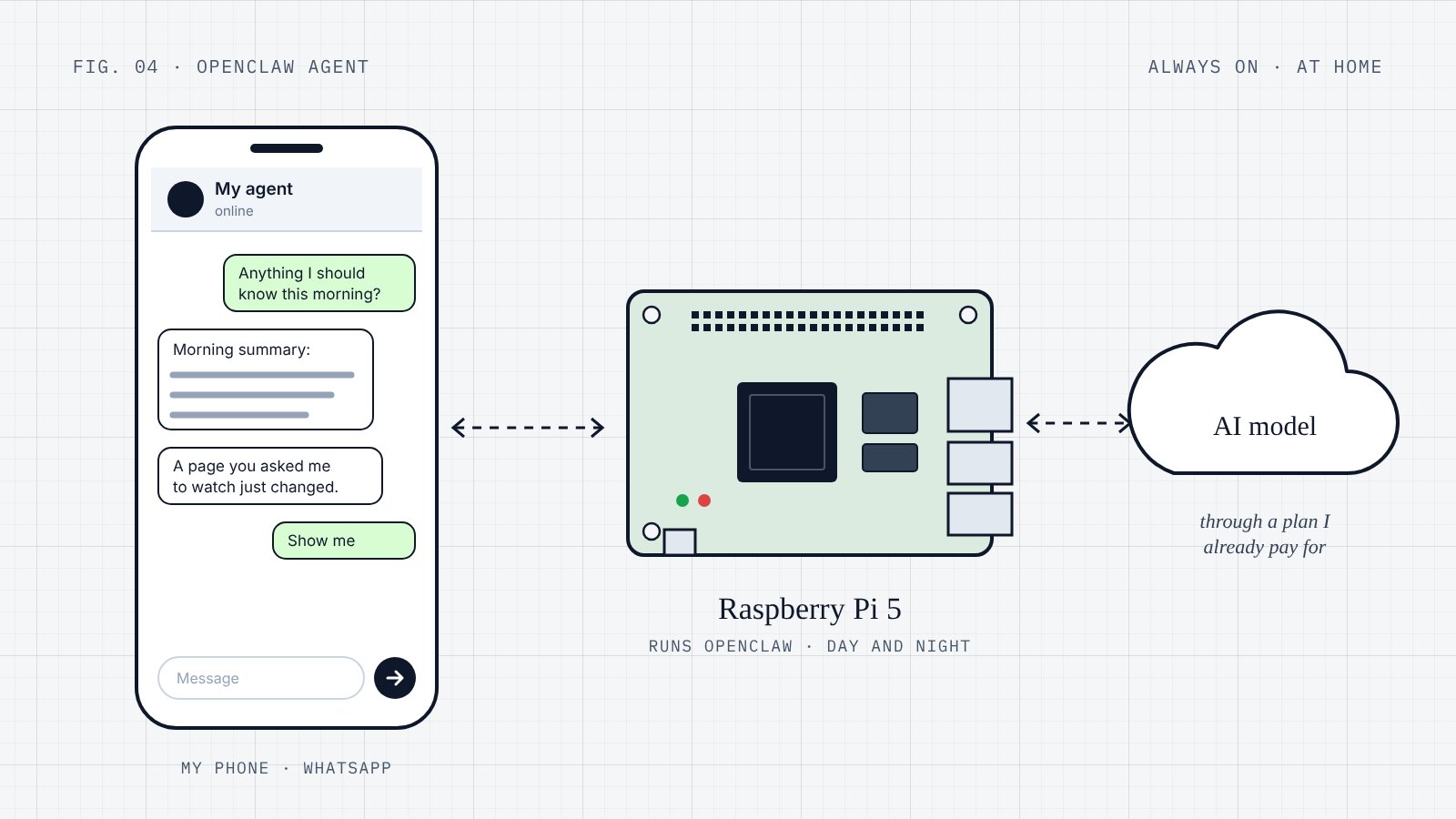
The hardware
- A Raspberry Pi 5. It sits next to my router and stays on all the time. The electricity costs a few cents a day.
- A Mac at home, which runs a backup AI model.
I already owned both, so I didn’t have to buy anything.
The software
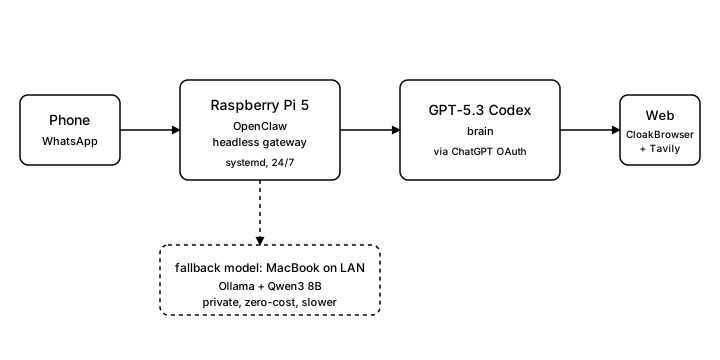
OpenClaw runs as a background service on the Pi, so it starts by itself when the Pi boots and keeps running. Everything is set up in one settings file. Nothing heavier than that.
The AI model, through my ChatGPT subscription
This was the part that surprised me.
OpenClaw can sign in to OpenAI’s models with your ChatGPT account, so you don’t need a separate API key. For one person’s use, that means the agent runs on my normal monthly ChatGPT subscription and I don’t pay per use. No surprise bills, and I don’t have to worry about leaving something running overnight.
A backup model on the Mac
The Mac runs a small open model locally, and the agent can use it as a second model. For the jobs I give it, the hosted model is still a lot smarter. But I like having a free, private option in reserve.
At first I wanted the local model to be the main one. My Mac doesn’t have much memory, though, and the models it can run at a usable speed weren’t smart enough for what I wanted. Running a slightly bigger one as the backup was the compromise.
Talking to it from my phone
The agent lives in a chat app on my phone. I message it like any other contact, and only people I have approved can talk to it.
I like this setup because there’s no new app to install and no new habit to build. I am in my chat apps all day anyway.
The tools
The ones I use most:
- Fetching pages, like RSS feeds, public APIs or web pages.
- Web search, live, through Tavily. The free tier is enough for me.
- A full browser, for pages that don’t work without one.
This is how it all fits together:
What it does right now
The jobs running now are a bit random. I am mostly testing what the agent can do and where it breaks. None of it is important, and that’s on purpose.
There are two kinds of scheduled jobs.
Jobs where the AI does the work and decides what to tell me. The main one is a morning news summary: it reads a list of RSS feeds, summarises the last day, and sends it to me. A few others check public information and tell me when something has changed.
Plain scripts with no AI involved, for things that need to be exact, like keeping an eye on one specific number and messaging me when it crosses a line I set.
I split them like this on purpose. Summarising the news needs judgement, and the AI is good at that. Checking one exact thing needs to be precise, and a plain script does that more reliably.
What I haven’t let it touch yet
The obvious next step is connecting it to the things I use every day, like my email and notes. I haven’t done that yet, and I keep stopping myself.
The reason is I don’t trust it enough yet. I don’t really know where it makes mistakes, or how closely I would need to watch it. Right now if it gets something wrong, the worst that happens is a slightly off news summary. Once it’s in my inbox, a small mistake could actually cost me something.
So I am taking it slowly. I want to use it for a while longer and get a feel for how it behaves before I give it anything important.
What worked better than I expected
- Running it on the Pi. I thought I would need to rent a small cloud server, but it runs fine on a little box next to my router for almost nothing. No monthly bill, which matters when it’s still something I am playing with.
- Reaching it from my phone. I didn’t have to build an app or get anyone to install anything. It’s in an app I already have open all day, and that’s the main reason I actually use it.
- Splitting the jobs into two kinds. I didn’t expect this to matter so much. AI for the jobs that need judgement, a plain script for the ones that need to be exact. Getting that right saved me more trouble than switching to a better model would have.
- The cost. Because it runs on my ChatGPT subscription, I don’t think about usage. I can leave jobs running overnight without worrying about a bill, and that makes me a lot more willing to try things.
Where AI coding tools came in
AI coding tools are what let me get all of this working without getting stuck.
I am a business and operations person, not an engineer. The Pi setup, the background service, the chat app connection, the sign-in, the schedules and the scripts could each have had me stuck for a week. Instead I worked through each problem with AI coding tools, mostly Codex and Claude Code, and kept going.
That’s probably the biggest thing I have learnt from this. The hard part used to be the technical knowledge. Now the hard part is mostly deciding what I want the thing to do.
What’s next
It’s not finished. I keep adding tools, changing what’s scheduled and adjusting how it talks to me. Some of it works and some of it doesn’t.
Later on I might move it to a more powerful machine that can run a decent local model too. Then everything would be on one box, and I could probably stop using the hosted model.
For now, the Pi and my ChatGPT subscription work well for me. The whole point was to see how cheaply I could do this, and it’s a lot cheaper than I expected.
— Howie