I wrote about why I started this site earlier. This one is about how it got built. It changed a lot more than I expected, and a lot of the changes were me undoing things.
AI coding tools made most of the changes. My part was mostly deciding what I wanted, looking at the result, and approving it or editing a file myself in GitHub’s website.
What I used
- GitHub for the code and the posts. It’s also how I edit the site, more on that below.
- AI coding tools for the building. Mostly Codex and Claude Code these days, and I have tried Gemini too.
- Astro, which turns Markdown files into web pages, and Tailwind for the styling.
- Cloudflare to host it and for the domain.
- Web3Forms, a service that sends the contact form to my email, so the site doesn’t need its own server.
The site has no server and no database. Every page is built once into plain files, and Cloudflare serves those files. That’s a big part of why it costs almost nothing to run.
The first try
The very first version took an AI coding tool a few minutes: a “production-ready Next.js personal site”.
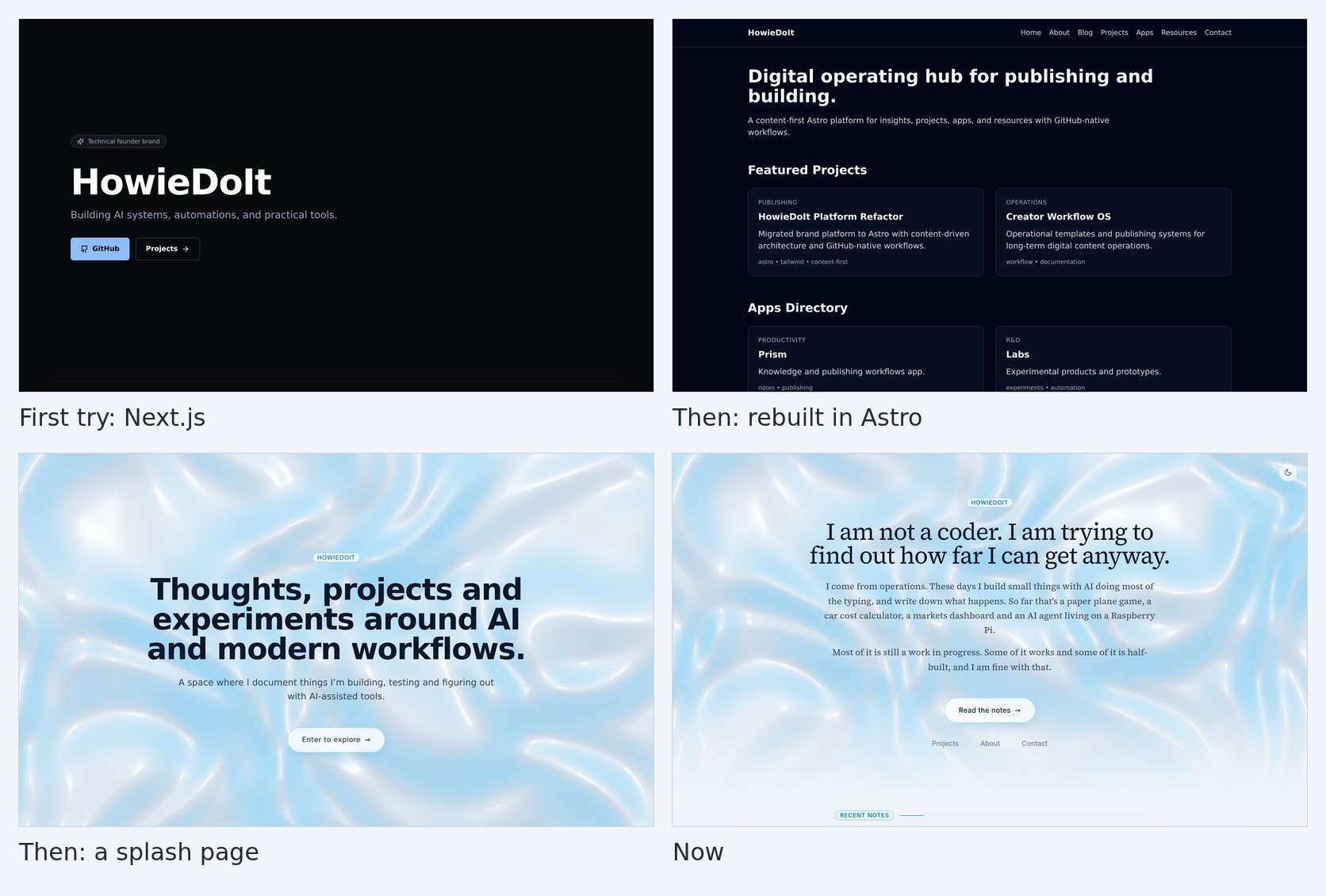
You can see it in the top left of the picture above. Black page, my name in big letters, a GitHub button, and a little badge that says “Technical founder brand”. That’s the AI’s idea of a personal site, and it’s pretty much everything I didn’t want. I am not a technical founder and I didn’t want a brand.
Then it was rebuilt in Astro, which is made for content sites like this one. Posts are just Markdown files, and it doesn’t need a server.
The Astro version is the top right. It’s called a “Digital operating hub for publishing and building”, and the project cards are all made up. “Creator Workflow OS” isn’t a thing I have ever built. The AI filled the empty spaces with confident placeholder text, and I hadn’t given it anything better.
Getting it online
The first deploy to Cloudflare failed, because it couldn’t find the finished site. A small settings file telling it where to look fixed that.
The AI also added things that sounded useful and turned out not to be needed, then took them out again on the next look. That happens a lot.
Then it found a problem I couldn’t see. The blog posts weren’t actually being turned into pages, because Astro had changed how it handles content. The site looked fine. It just had no posts.
The capital C that broke the build
The animated blue background on the homepage is a small WebGL shader. That’s code that runs on your graphics card and draws moving colours. What I like about it is that all its settings live in one file: which look to use, how fast it moves, how bright it is.
Early on, I opened that file in GitHub’s website and changed the look to “Calm”. The build crashed. The code only knew that look as “minimal”, in lowercase, so the shader got nothing and fell over.
Because the build failed, the change never went live, which is the good part. Cloudflare keeps showing the last version that worked. The fix was to accept any capitalisation, and to fall back to the first look instead of crashing if a name doesn’t match.
Rules for the AI
Straight after that, I had the AI write a set of instruction files that AI coding tools read before they start: one for the design, one for where files go, one for how posts are written, and one for how the site goes live.
This turned out to be one of the most useful things I did. Every new AI session starts with no memory of the last one. Without these files, each session made its own decisions. With them, the site stays roughly the same shape no matter which tool is working on it.
The biggest change to those files came when I wrote down what the site actually is: a notebook where I figure things out in public, and not a startup landing page or a founder brand. Once that was written down, a lot of design questions answered themselves.
A few days of redesigning
For the first few days, the look of the site changed constantly. Looking back, most of it was me working out what I wanted by seeing what I didn’t.
- The light theme was too stark white, so it got softer.
- The shader got more looks, and a liquid chrome one became the blue you see now.
- The accent colour across the whole site comes from whichever shader look is active. Change the look, and the links and buttons change colour with it.
- The fonts changed twice in one day, until I found a serif that gets out of the way of the words.
- The homepage became a splash page, with one “Enter to explore” button that took you to the About page.
The splash page is the bottom left in the picture. It looked nice and it was a mistake. There was no way to get anywhere except that one button, and it went to the About page, not the writing. People were landing on the homepage and leaving without ever opening a post. So now the homepage shows the latest notes right under the headline, and the main button goes to the blog.
Dark mode had its own problem. The shader looks the same in both modes, so in dark mode the homepage was white text on a bright pastel background. It’s darkened in dark mode now.
Making it sound like me
I am still working on this one. AI writes very smoothly, and the first drafts of my posts sounded like a LinkedIn post, confident and nothing like how I talk.
So the writing instructions have grown a long list of rules for how it should sound. Some of them:
- No em dashes. The only one allowed in my writing is the one before my name at the end of a post.
- No “Honestly”, “genuinely” or “the honest answer” over and over.
- No “It wasn’t X. It was Y.” setups.
- No dramatic one-line endings at the end of a section.
- Write “I am”, “I would”, “I have” and “I will” in full, the way I write.
- Singapore dollars and cents, British spelling, and Singapore as the starting point for examples. An early draft said “pennies”.
Most posts here start as an AI draft, and I say so. But they go through those rules, and then through me.
How I edit the site now
All the words on the site live in one folder. Posts are Markdown files, and the project cards and homepage text are small settings files. The code that turns all of that into pages lives somewhere else, and I don’t need to open it.
To fix a typo, I open the file on GitHub’s website, press the pencil icon, change it and save. Cloudflare rebuilds the site and it’s live a couple of minutes later. You don’t even need a laptop for that. A phone works.
A post is just a text file with a few lines at the top: a title, a date, some tags, a one-sentence summary for the list of posts, and a publish switch. Switching it off hides a post everywhere while I am still writing it.
For anything bigger than a typo, I ask an AI coding tool. It makes the change on its own branch, Cloudflare builds a preview of that branch at its own address, and I only merge it if the preview looks right.
If you want to build your own
This is the order I would do it in now.
-
Write down what the site is, and isn’t, first. One paragraph. Mine would have saved me a few days of redesigning.
-
Make a GitHub account and an empty repository.
-
Ask an AI coding tool for an Astro blog. Something like this:
Build a personal blog with Astro and Tailwind. Put all posts as Markdown files in a /content/blog folder and all other text in JSON files in /content, so I can edit everything from GitHub's website. No server, no database. Write an instructions file for AI tools explaining where things go. -
Connect the repository to a host like Cloudflare, Vercel or Netlify. If the first deploy fails, paste the error into your AI. Mine was one small settings file.
-
Add your domain in the same dashboard.
-
Write your first post before you touch the design. The design is much easier to judge with real words on the page.
-
Change one thing at a time, with a preview before anything goes live. If a change breaks the build, the live site stays as it was.
-
Write down your voice rules as you notice what you don’t like. Every time the AI writes something that doesn’t sound like you, add a line.
It’s still changing, and this post will probably be out of date soon. I am OK with that.
— Howie